가구 배치하다 보면 간격이 궁금하다. 침대랑 벽 사이 몇 cm?
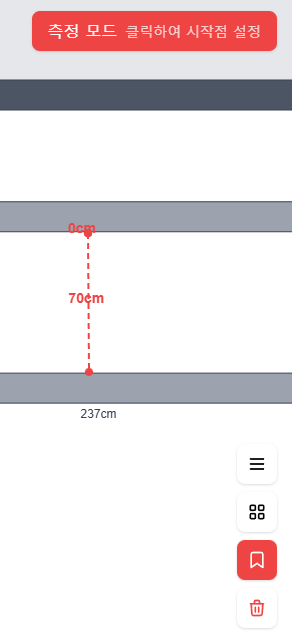
측정 모드
일반 모드와 측정 모드를 분리했다.
const mode = ref<'normal' | 'measure'>('normal');

function toggleMeasureMode() {
  mode.value = mode.value === 'measure' ? 'normal' : 'measure';

  if (mode.value === 'normal') {
    // 측정 모드 종료 시 임시 데이터 초기화
    measureStart.value = null;
  }
}
M 키 또는 버튼으로 토글.
두 점 클릭
측정 모드에서 캔버스 클릭:
const measureStart = ref<Point | null>(null);
const measurements = ref<Measurement[]>([]);

function handleCanvasClick(e: KonvaEventObject<MouseEvent>) {
  if (mode.value !== 'measure') return;

  const pos = getCanvasPosition(e);

  if (!measureStart.value) {
    // 첫 번째 점
    measureStart.value = pos;
  } else {
    // 두 번째 점 → 측정 완료
    measurements.value.push({
      id: generateId(),
      start: measureStart.value,
      end: pos,
      distance: calcDistance(measureStart.value, pos)
    });
    measureStart.value = null;
  }
}
거리 계산
function calcDistance(a: Point, b: Point) {
  const dx = b.x - a.x;
  const dy = b.y - a.y;
  return Math.sqrt(dx * dx + dy * dy);
}
피타고라스. 1px = 1cm라서 그대로 cm 단위.
측정선 렌더링
<v-group v-for="m in measurements" :key="m.id">
  <!-- 선 -->
  <v-line
    :config="{
      points: [m.start.x, m.start.y, m.end.x, m.end.y],
      stroke: '#ff0000',
      strokeWidth: 2,
      dash: [10, 5]
    }"
  />
  <!-- 거리 텍스트 -->
  <v-text
    :config="{
      x: (m.start.x + m.end.x) / 2,
      y: (m.start.y + m.end.y) / 2 - 15,
      text: `${Math.round(m.distance)} cm`,
      fontSize: 14,
      fill: '#ff0000'
    }"
  />
  <!-- 양 끝점 표시 -->
  <v-circle
    :config="{ x: m.start.x, y: m.start.y, radius: 4, fill: '#ff0000' }"
  />
  <v-circle
    :config="{ x: m.end.x, y: m.end.y, radius: 4, fill: '#ff0000' }"
  />
</v-group>
진행 중 표시
첫 번째 점 찍고 마우스 움직이면 임시 선 표시:
<v-line
  v-if="measureStart && mousePos"
  :config="{
    points: [measureStart.x, measureStart.y, mousePos.x, mousePos.y],
    stroke: '#ff0000',
    strokeWidth: 1,
    dash: [5, 5],
    opacity: 0.5
  }"
/>
측정 삭제
측정선 클릭하면 삭제:
function deleteMeasurement(id: string) {
  const index = measurements.value.findIndex(m => m.id === id);
  if (index !== -1) {
    measurements.value.splice(index, 1);
  }
}
또는 “측정 초기화” 버튼으로 전체 삭제.
ESC로 취소
측정 중 ESC 누르면:
function handleKeyDown(e: KeyboardEvent) {
  if (e.key === 'Escape') {
    if (mode.value === 'measure') {
      measureStart.value = null;  // 진행 중인 측정 취소
      mode.value = 'normal';      // 일반 모드로
    }
  }
}
다음 글에서 키보드 단축키 시스템.