평면도에 문 표시하려면 생각보다 할 게 많다.
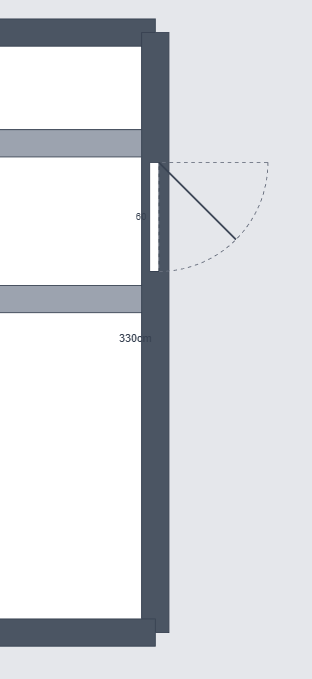
문 데이터
interface Door {
  id: string;
  x: number;
  y: number;
  width: number;       // 문 너비
  wallSide: 'top' | 'bottom' | 'left' | 'right';  // 어느 벽에 붙는지
  openDirection: 'inward' | 'outward';  // 안/밖으로 열림
  hingeSide: 'left' | 'right';  // 경첩 위치
}
문 그리기
문은 두 부분으로 구성:
- 문짝 (사각형)
- 열림 호 (Arc)
<template>
  <v-group :config="{ x: door.x, y: door.y }">
    <!-- 문짝 -->
    <v-rect
      :config="{
        width: door.width,
        height: 10,
        fill: '#8B4513'
      }"
    />
    <!-- 열림 호 -->
    <v-arc
      :config="arcConfig"
    />
  </v-group>
</template>
호(Arc) 계산
이게 까다로웠다.
function getArcConfig(door: Door) {
  const radius = door.width;

  // 경첩 위치에 따라 시작점 다름
  let x = door.hingeSide === 'left' ? 0 : door.width;
  let y = door.openDirection === 'inward' ? 10 : 0;

  // 각도
  let angle = 90;
  let rotation = 0;

  if (door.hingeSide === 'left') {
    if (door.openDirection === 'inward') {
      rotation = -90;
    } else {
      rotation = 180;
    }
  } else {
    if (door.openDirection === 'inward') {
      rotation = 180;
    } else {
      rotation = -90;
    }
  }

  return {
    x,
    y,
    innerRadius: 0,
    outerRadius: radius,
    angle,
    rotation,
    fill: 'transparent',
    stroke: '#666',
    strokeWidth: 1,
    dash: [5, 5]
  };
}
경첩 위치(좌/우) × 열림 방향(안/밖) = 4가지 경우.
각각 rotation이 다르다. 이거 맞추느라 시간 좀 걸렸다.
벽 스냅
문을 드래그하면 벽에 붙어야 한다.
function snapToWall(door: Door, room: Room) {
  const walls = [
    { side: 'top', y: room.y, x1: room.x, x2: room.x + room.width },
    { side: 'bottom', y: room.y + room.height, x1: room.x, x2: room.x + room.width },
    { side: 'left', x: room.x, y1: room.y, y2: room.y + room.height },
    { side: 'right', x: room.x + room.width, y1: room.y, y2: room.y + room.height }
  ];

  const threshold = 20;  // 20px 이내면 스냅

  // 가장 가까운 벽 찾기
  let closestWall = null;
  let minDistance = threshold;

  for (const wall of walls) {
    const distance = getDistanceToWall(door, wall);
    if (distance < minDistance) {
      minDistance = distance;
      closestWall = wall;
    }
  }

  if (closestWall) {
    // 벽에 붙이기
    return snapPosition(door, closestWall);
  }

  return null;
}
단축키
D: 열림 방향 토글 (inward ↔ outward)H: 경첩 위치 토글 (left ↔ right)
function handleKeyDown(e: KeyboardEvent) {
  if (!selectedDoor) return;

  if (e.key === 'd' || e.key === 'D') {
    toggleOpenDirection();
  }
  if (e.key === 'h' || e.key === 'H') {
    toggleHingeSide();
  }
}
다음 글에서 측정 도구.